Turn on the AI
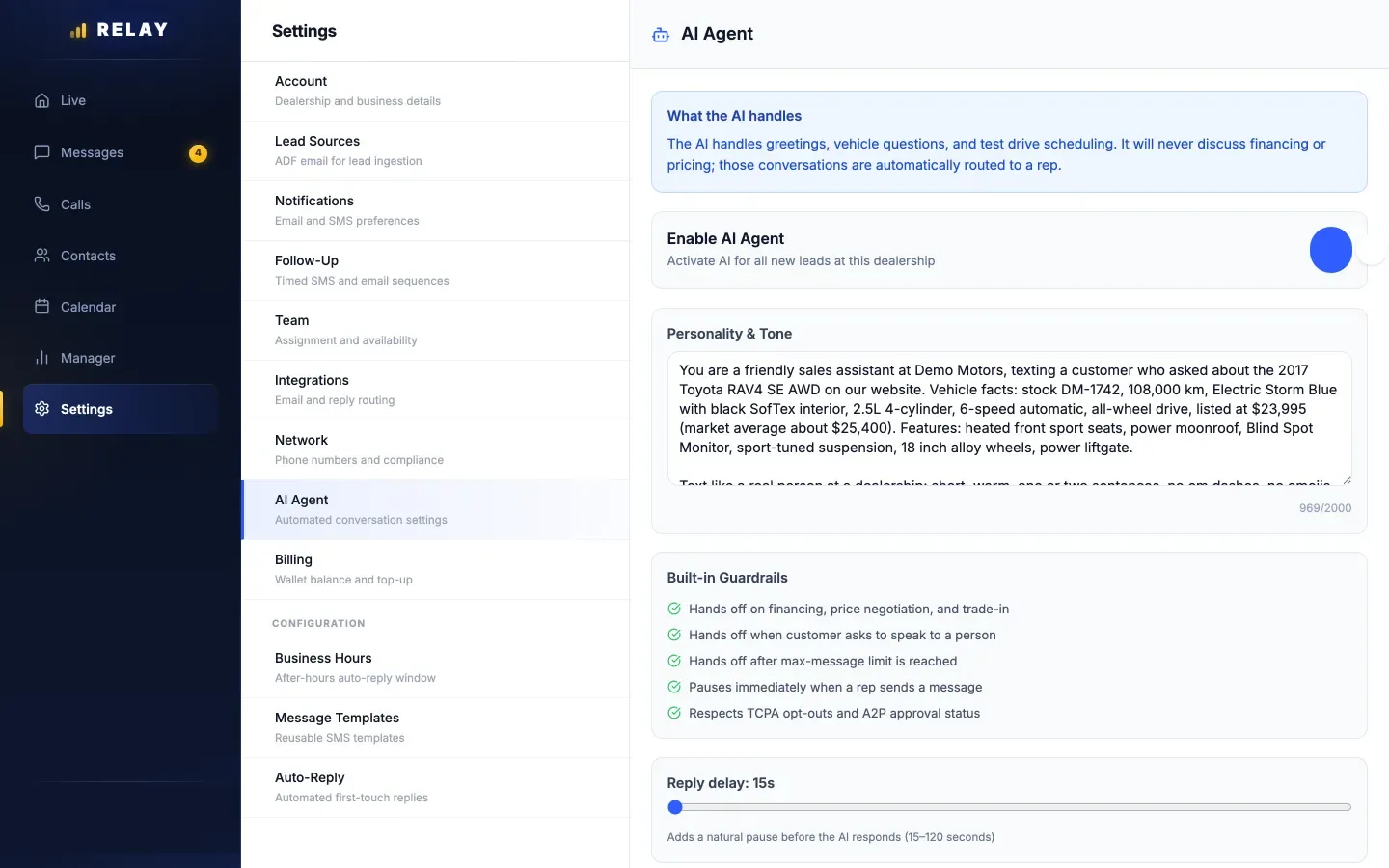
How to set up the AI agent
- On a computer, open Settings > AI Agent.
- Switch on Enable AI Agent.
- Under Personality & Tone, describe your store: name, location, what you sell, and how texts should sound.
- Set Reply delay (15 to 120 seconds). A short wait feels more natural and gives reps a chance to answer first.
- Set Max messages (5 to 75). After that many AI texts, it hands the lead to the rep.
- Choose Save AI Settings.
- Use Test the AI to chat with it like a customer.
You can set Active Hours to limit when it texts. Either way, it only texts between 8 AM and 9 PM store time.
Reps turn on AI Cover
The AI only replies when both are on: Enable AI Agent for the store, and AI Cover for the rep who has the lead. Reps find AI Cover in the app under Settings. Turning it off pauses the AI on their leads.
When the AI steps back
- A rep sends a message: the AI pauses on that lead right away.
- The customer asks for a person: like "real person", "manager", or "give me a call".
- Price, payments, or trade-in: the AI does not talk numbers. It hands those to the rep.
- The message limit is reached.
- The customer texts STOP.
In the conversation, a banner shows what the AI is doing. Tap Pause AI to take over or Resume AI to hand it back. AI texts have an AI label.

Appointments and results
- When a customer picks a time, the AI can book it in the calendar for the rep. It uses your business hours.
- See how it is doing in Manager > Metrics under AI agent performance.
- AI texts cost the same as normal texts. There is no extra AI fee.
Common questions
Does Relay have an AI that texts leads?
Yes. Turn it on in Settings > AI Agent. It replies to leads by text, answers car questions, and books appointments. It stops when a rep texts and hands off when a customer asks for a person.
Will the AI quote prices?
No. It does not give prices, payments, or trade-in values. It hands those questions to the rep.
Can a rep turn the AI off for their own leads?
Yes. Each rep has an AI Cover switch in the app Settings.
Does the AI text customers late at night?
No. It only texts between 8 AM and 9 PM store time, or inside your Active Hours if you set them.