What Relay does
Relay sends new leads to your phone. You claim a lead, then text or call the customer from a dealership number. Your personal cell number stays private. Relay works next to the CRM your store already uses.
Two words you will see: a contact is a customer. A lead is one request from that customer, like a web form about a car. In some places Relay calls a lead an inquiry. It means the same thing.
Set your password
You cannot sign up on your own. Your manager adds you, and Relay sends you an email.
How to set your Relay password
- Open the email that says "You've been invited to [your dealership] on Relay".
- Tap Get Started. Do this within 24 hours.
- Type a password (8 characters or more) in New password.
- Type it again in Confirm password.
- Tap Set password. Relay signs you in.
- Now get the app on your phone (next section).
If you see "Link invalid or expired", ask your manager to tap Resend next to your name in Settings > Team. Each link works once.
Get the app
Search for Relay by RazzyTech, or tap a link: App Store for iPhone (iOS 17 or newer) or Google Play for Android (Android 7.0 or newer). iPad is not supported.
Set up the app
- Install the app and open it.
- Sign in with your email and password.
- Tap Allow when the app asks to send notifications. Without them you will miss new leads.
- If you work at more than one store, pick one on the Select Dealership screen.
- Ask your manager to mark you Available. New people start as Unavailable and get no leads until then.
Sign in on a computer

- Go to app.userelay.ca.
- Type your email and password, then choose Sign in.
- Forgot your password? Choose Forgot password? and follow the email.
- Ignore the Sign up link. It is not for dealership staff. Your manager sets up your account.
- The web app is made for a computer. On your phone, use the app.
Sign in with a text code instead
You can sign in with a 6-digit code sent by text. This only works if your cell number is saved on your account.
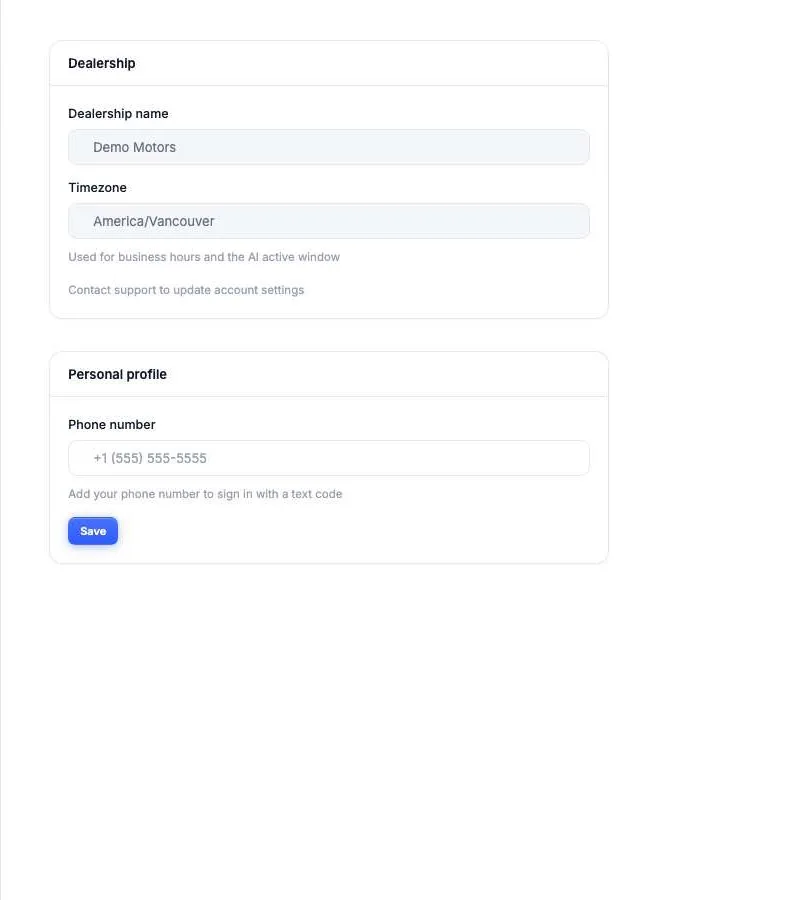
- To save your number: on the web, open Settings > Account, type it under Phone number, and choose Save.
- On the web: choose Sign in with phone number and type your cell number.
- In the app: tap Sign in with SMS instead.
- Type the code Relay texts you.
Find your way around
| What you want | In the app | On a computer |
|---|---|---|
| New leads to claim | Live tab, or the + button | Live |
| Your conversations | Messages tab | Messages |
| Calls and voicemail | Call button in a conversation | Calls |
| Customer details | View contact, in a conversation | Contacts |
| Appointments | Calendar tab | Calendar |
| Your settings | Settings tab | Settings |
| Manager tools | Settings > Metrics Dashboard | Manager (managers and owners) |
Stuck? See fix a problem.
Common questions
How do I get a Relay login?
Ask your manager to invite you from Settings > Team. You get an email with a Get Started link. Dealership staff cannot sign up on their own.
Where do I get the Relay app?
Search for Relay by RazzyTech in the App Store (iPhone, iOS 17 or newer) or Google Play (Android 7.0 or newer). Sign in with the same email and password you use on the web.
Can I sign in without a password?
Yes, if your cell number is saved on your account. Choose Sign in with phone number on the web, or Sign in with SMS instead in the app, and type the 6-digit code.
I work at two stores. Do I need two logins?
No. One login can belong to several stores. In the app, pick the store after you sign in. Switch later in Settings > Switch Dealership.