Move all of a rep's leads
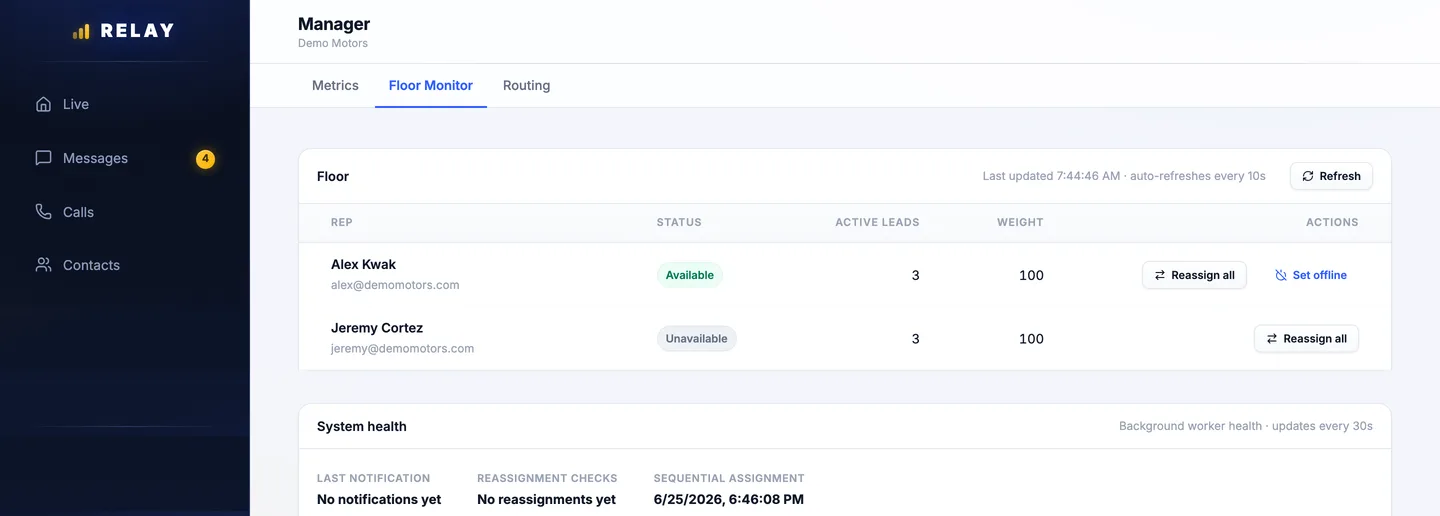
How to move a rep's leads
- Open Manager, then the Floor Monitor tab.
- On the rep's row, choose Reassign all. Or choose Set offline to also stop new leads for them.
- Pick Reassign all to a specific rep, or Distribute via routing rules to share them out.
- Confirm. The new rep gets a notification for each lead.
Move one lead
Open the conversation in Messages and choose Reassign at the top. In the app, tap ••• and choose Reassign. The history moves with the lead, and the customer keeps the same number.
Read the floor
Each row shows the rep, their Status (Available, Unavailable, or On vacation), and their Active leads. The list updates every 10 seconds. Choose Refresh to update it now.
Setting a rep offline sends back their leads that have not had a call. If they are only stepping away, move their leads on purpose first.
Common questions
How do I move a rep's leads to someone else?
In Manager > Floor Monitor, choose Reassign all on their row. Send everything to one rep, or share it out with your routing rules.
Stuck on something this guide does not cover? Text the Relay team at 778-764-1975, call 1-855-467-2999, or email tej@razzytech.com. Back to all help guides.